SAP recently released SAP BusinessObjects 4.1 SP2. This release helped bring the 4.0 SP5.14, SP 6.6, SP 7.2 and SP 8.0 fixes and features into the 4.1 build. In addition there are also several Web Intelligence enhancements that were obscurely listed in the “SL RESTful section” of the “What’s New” guide. (That is until they recently fixed the document.) After reading the guide, my first impression was that the options listed within only applied to the RESTful SDK. After testing 4.1 SP2, I found that they also applied to the WebI GUI. With that said, below is a top 4 listing of the new Web Intelligence features that are (in my opinion) “so amazing”.
- User can create Web Intelligence reports, based on an Excel document, stored in the BI Launch Pad. This is a real surprise that gives Web Intelligence new life in the self-service BI arena. User can now take an Excel document (formatted like a database table) and create a Web Intelligence report. You can also merge the results with an existing Universe query.
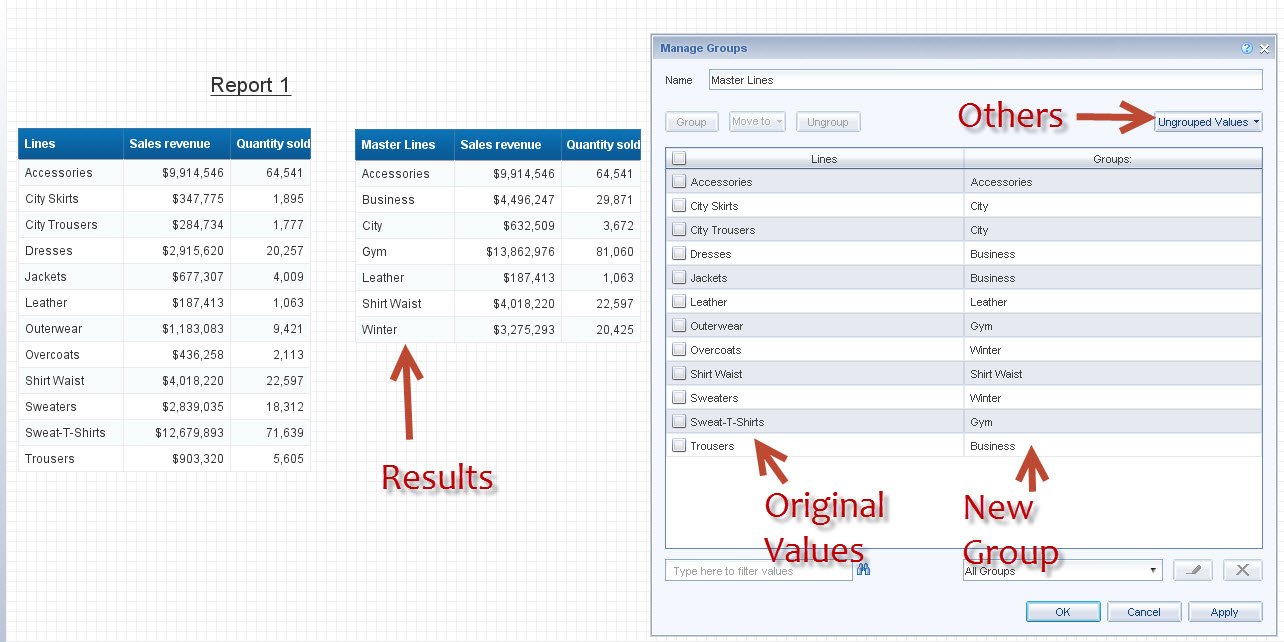
- If you ever used Desktop Intelligence and loved the “Group By Variable” wizard, you’re in luck. Web Intelligence 4.1 SP2 now includes the same feature. Users can create their own variables that produce a custom (graphical) grouping based on an existing Dimension’s values. It also works in all three WebI designers. (Web, Java, Desktop).
- There are predefined cells for each query Prompt based on the Prompt Text. You can now quickly add a cell to your report that displays selected values from any defined prompt. This is a really great feature that has been needed for over 10 years.If you think about it, this will not only reduce development time but also reduce the time it takes to complete the training course. 🙂
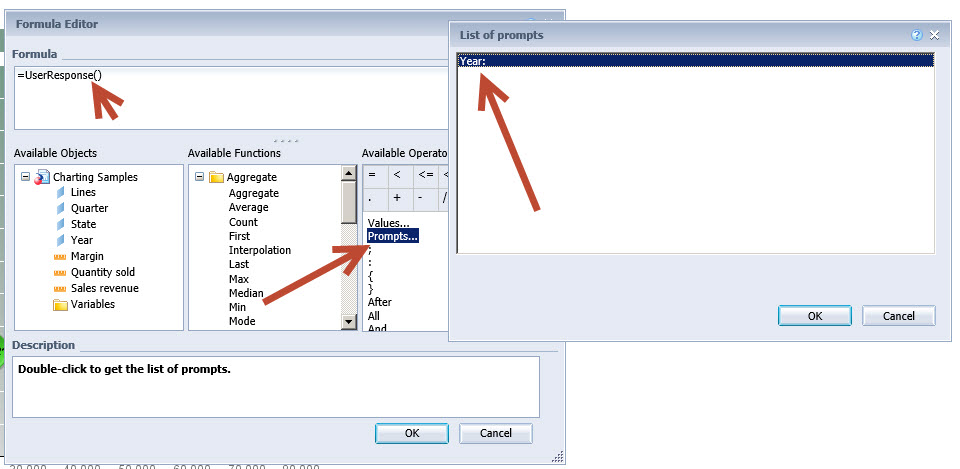
- There is a quick Prompt text add dropdown list in the formula editor. The dropdown list automatically adds the precise prompt text for use in the UserResponse(“Prompt Txt”) function. Look for it at the top of the “Available Operators” window in the formula editor.
I have not had time to discover all the changes in 4.1 SP2 but the Web Intelligence specific changes have been needed for severals years. Deski lovers have been begging for the Group By option. Hopefully these enhancements will help more organizations move away from Deski (Die Deski, Die!!!).
Where do you find the Grouping or Group By Variable Option?
Look under the Analysis then Display Tabs for the new “Group” button and dropdown.

The wizard allows you to “Group” values from an existing dimension, enabling you to create a new custom super-grouping.
Where do you find the Prompt and Prompt Text Helpers?
Look under Report Elements then Cell for the “Pre-Defined” button and dropdown. Choose the Prompt option to list pre-defined cells for each prompt defined in the query.

In the formula editor, look in the Available Operator window for the “Prompts…” option. Double click to get a list of available Prompt Text. It only returns the Text in double quotes, so you will need to type the UserResponse() function.
Other BOBJ 4.1 SP2 Links:
Blog Posting on SCN by Patrick Perrier
Blog Posting on SCN by WILLIAM MARCY
forward fit information (Requires SMP Logon)
Known Issues:
Web Intelligence Java Applet not working: http://service.sap.com/sap/support/notes/1917336
logonNoSso.jsp not working: http://service.sap.com/sap/support/notes/1919245
 SAP BI Blog