
As more and more organization implement SAP HANA native, S4/HANA or sidecar solutions, the need to understand how to provide access and secure information views has emerge. The intent of this article is to provide the reader with a few technical details relevant to securing SAP HANA information views.
Before we describe how to secure an information view, let’s quickly define the various information views that are available within SAP HANA.
Attribute Views
Attribute Views are created to serve as a reusable type of view. Developers will create Attribute Views to represent items such as customers, products, dates, salespersons and cost centers. Once activated, they can be joined to one or more analytic view data foundations. Within an attribute view we can also create Hierarchies.
Analytic Views
Analytic Views are created to serve as the SAP HANA Cube. When designing the analytic view, developers will design a data foundation using transaction columnar tables found in a SAP HANA schema after provisioning data. The analytic view data foundation is then joined to existing attribute views in the logical join foundation. In the final stage of development, two items are identified. First attribute views and private attribute are identified as Attributes. Numeric Fields are identified, aggregated and marked as measures.
Calculation views
Calculation views were originally created to address complex calculations or to virtually model data sets into the desired format. They can use attribute views, analytic views or columnar tables as their source. They support modeling transforms such as join, union, aggregate and project. They are created using using either a GUI or a script using SAP HANA SQLScript. The final output of a calculation view can contain attributes, measures and hierarchies.
Note: Starting with SAP HANA 2.0 we should start using Dimensional Calculation Views and Star Join Calculation Views as replacements for Attribute Views and Analytic View.
Analytic Privileges
Analytic Privileges are not technically an information view. However they are closely associated with information views. In general, they provide both information view query access and row level security. When you create a SAP HANA user or role, you can assign analytic privileges. Analytic privileges in turn provide security for information views.
General Information
All information views are created is SAP HANA Studio and their developer code is stored within the content and package hierarchy. When an information view is activated a series of SAP HANA specific column views are created in the _SYS_BIC schema. This is an important concept when securing SAP HANA information views. In general there are three areas where we need to define information view security. You must establish security for developer Packages, SQL Privileges on _SYS_BIC column views and Analytic Privileges.
Security Areas
Securing Packages
Packages need to be secured in order to define the level of access a SAP HANA developer has when creating or editing an information view. Users and BI tools do not access packages when they query an information view. Therefore this level of security does not affect access to the underlying data. It only establishes rights for developers using SAP HANA Studio.

- An example List of SAP HANA Packages
When adding package privileges to a SAP HANA user or role, the administrator can choose to provide access to the root package (all packages), a specific top level package or a specific sub package. All information views within the designated package will inherit the rights established for the selected package. If you grant the rights on the root package, all information views will assume the defined rights.

- SAP HANA Package Privileges
There are multiple privileges that can be assigned to a package for a given user or role. REPO.READ allows the developer to see the package and an information view definition but it will not allow the developer to make changes. The three rights for native packages apply to information views created directly in an environment. For example, information views created in the development environment. This is where we establish create and edit rights as well. The three rights for imported packages apply to information views that were imported from a development environment. This is handy if you want to prevent developers from making changes to imported packages within Production.
Securing column views in the _SYS_BIC schema
When a developer activates an information view within a SAP HANA package, the system generates one or more column views in the _SYS_BIC schema. When users or BI tools query an information view, they query the information view in the form of a column view. Column views are similar to standard database views but they are actually specialized views designed for the various SAP HANA query engines and Analytic Privileges.

- Above is a sample listing of column views that are created when an attribute view is activated.
Because column views are SQL objects, they must be secured for users and roles using object privileges (formally SQL privileges). Administrators can choose to either provide access to the entire _SYS_BIC schema or to the individual information views.
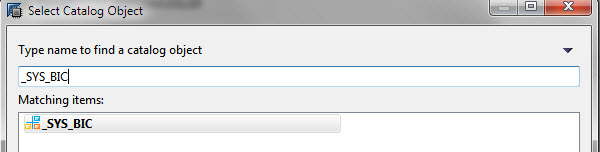
Provide Access to the entire _SYS_BIC schema.
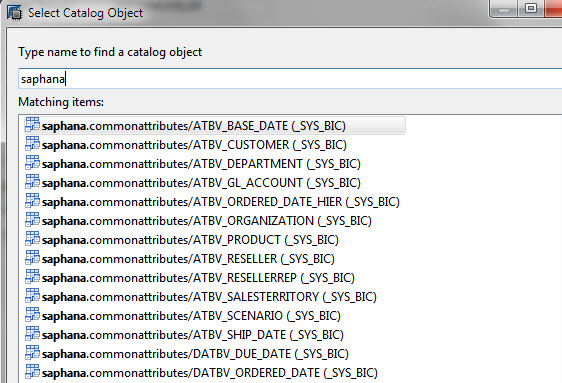
Provide Access to the individual column views in the _SYS_BIC schema
It is important to understand that there is an additional layer of information view security in the form of analytic privileges. Administrator can simply grant access to the entire _SYS_BIC schema and then leverage Analytic Privileges to secure the information view. However, as of SPS6 of SAP HANA developers can now choose to activate an information view that ignores analytic privileges. Therefore it is important to pay close attention to both _SYS_BIC Object privileges and Analytic Privileges.
At a minimum, users need the SELECT right on each information view’s associated column view. This can be assigned to the entire _SYS_BIC schema or to individual column views.

We need to grant SELECT on _SYS_BIC or the column views
Analytic Privileges
Analytic Privileges are the final area where we can secure information views. They are not created in the normal security areas of SAP HANA. Instead they are created by developers (or Administrators) and stored within packages. With that said, they are assigned to users or roles by an Administrator in the normal security areas of SAP HANA studio. Some believe that Analytic Privileges are only used to provide row level security. This is not entirely true. Every user or role in SAP HANA must have an assigned analytic privilege to access an information view. However, there is a special analytic privilege named “_SYS_BI_CP_ALL” that can be assigned to grant full access. This Analytic Privileges effectively provides access to all information views and data rows. Be careful when assigning this analytic privilege. When you assign multiple privileges to a user, each individual privilege is honored. However, each subsequent privilege is assigned using an “OR” operator. This means that the least restrictive privilege will provide the access. Its too bad this “OR” condition can not be changed but this is how it works at the moment.
Analytic privileges provide two levels of access. First they grant access to an information view. They then have an extra optional layer of security that can restrict access to specific rows of data. This can be tricky to understand so you might want to read this a few times and then experiment in your own environment. On the right side of the Analytic Privilege design window developers can define one or more filters based on one or more attribute views. This is the area where we can setup row level security. Don’t forget that each assigned analytic privilege is assigned with an “OR” operator. If you truly want row level security, it can be a chore to setup a robust data level security model. You would have to create numerous database roles and multiple extreamly explicit analytic privilege filters. However, there is a way to setup a stored procedure driven model that can simplify this setup. For more information on this, visit the article found here
Note 1/1/2017: SAP HANA now supports both dynamic and SQL based analytic privileges. Both options greatly reduce the complexity, maintenance and setup requirements related to data level security.
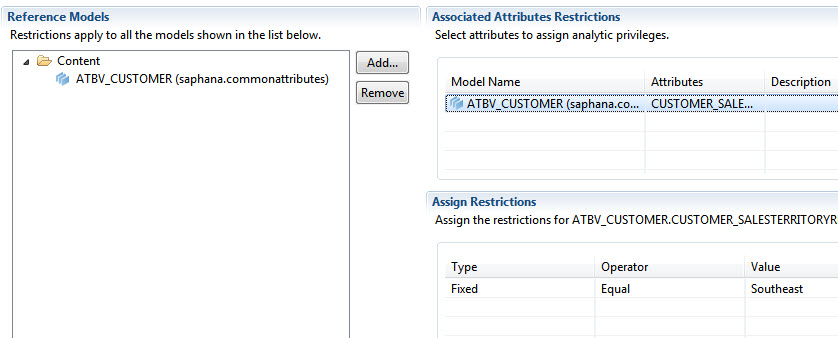
On the right side we need to assign the row level filters.
The three areas described above all play a role in either securing content for developers or securing content for end users. For those looking to establish a security model for SAP HANA information views, I hope this information will give you a head start.
 SAP BI Blog